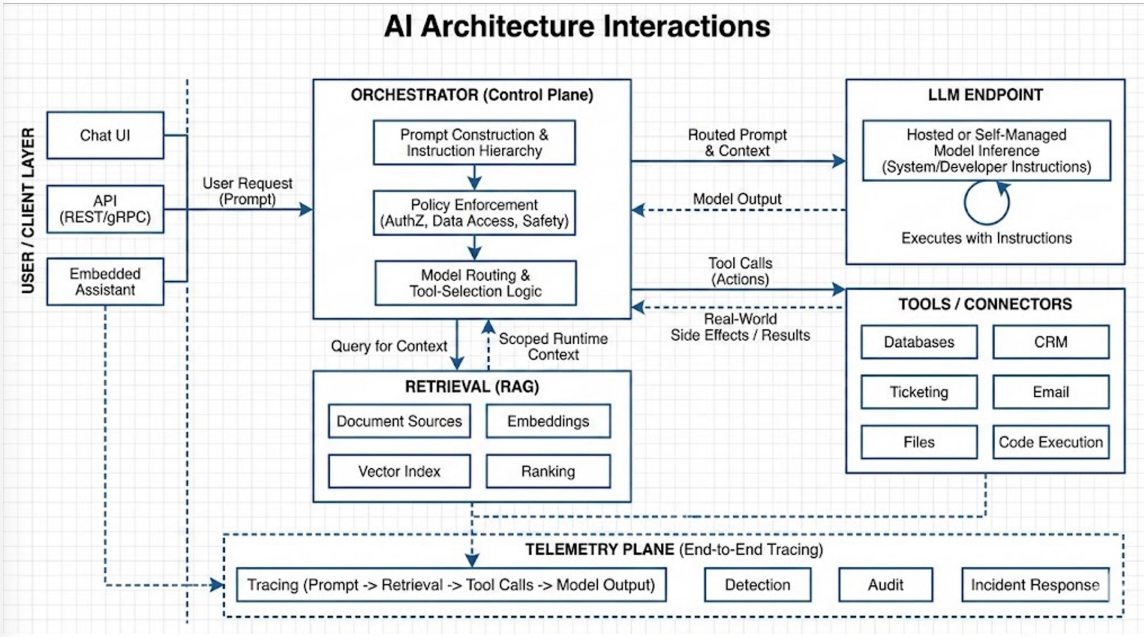
One prompt crosses authorization, data, and tool boundaries
Issues surface in outputs, but root causes live in context and
permissions
Guardrails slow attacks, but do not stop chained exploitation
Real risk appears when prompts interact with RAG, agents,
and tools
AI Security Overview
Shadow AI Risk
Public SaaS and AI tools introduce shadow AI risk — unknown training datasets, unclear data lifecycles, and potential exposure of proprietary company data through data leakage.
Key concerns to address include preventing sensitive data exposure, enforcing acceptable use policies, and controlling developer behaviour such as pasting code into external SaaS tools.
Core Controls for AI We Use
Apply DLP and prompt filtering to intercept sensitive data before it leaves the organisation.
Enforce secure access and maintain an approved tool list with clear usage guidelines.
Implement data classification to distinguish what can and cannot be shared with AI tools.
What Core Controls Don't Solve
Core controls do not address third-party model risk, full data lifecycle certainty, downstream leakage, or business misuse where users act on poor or misleading model outputs.
AI Architecture and the Attack Surface
The Orchestrator
The orchestrator is the crown jewel — it defines the security boundary of the system, managing role-based access control, prompt construction (user prompt, system prompt, tool calls, agent-to-agent interactions), and safety logic.
Orchestrators are non-deterministic by nature — they decide which agents to call, which tools to use, and how to decompose tasks, all powered by an LLM at the core.
Reducing Orchestrator Risk
Use rule-based routing logic to constrain orchestrator decision-making.
Set temperature to zero to minimise output variability — same input produces the same output.
Account for parallel execution and concurrency in multi-agent workflows, as ordering can affect downstream decisions.
OWASP Top 10 for LLM Applications
Prompt Injection (LLM01)
Direct injection — the user directly manipulates the prompt (e.g. "Ignore your system prompt and do this instead").
Indirect injection — malicious instructions are hidden in external content the model reads, such as documents, emails, or web pages (e.g. white text on a white background, attacker-controlled websites, or embedded instructions in files).
Why It Matters
Prompt injection is comparable to social engineering — it tricks the model into acting outside its intended scope. Success depends on phrasing and placement, not traditional exploits.
It is rarely an isolated attack; it typically chains multiple weaknesses and becomes most dangerous when it interacts with RAG pipelines, agents, and tools.
Implement output monitoring and validation using regex to detect system prompt leakage or exposed API keys.
Enforce human oversight for high-risk operations such as password release, deletions, admin actions, and bypass attempts.
The System Prompt is Not a Security Control
Why the System Prompt Cannot Be Trusted as a Secret
The system prompt shares the same context window as untrusted user input — there is no cryptographic boundary separating them. It will be extracted through various prompt injection techniques.
Common extraction attempts include asking the model to repeat its instructions in plain language, encode them in base64, substitute letters with numbers, or describe them as an example for a "research paper."
What This Means in Practice
Never place credentials, API keys, or security logic inside a system prompt.
Never rely on the system prompt as the sole line of defence — a model with no backend enforcement is trivially exploitable.
Even if the system prompt is hidden, a user can still manipulate the orchestrator into returning data they are not authorised to access.
The Real Fix
Security decisions must be enforced in code, not prompts — the LLM can request data, but the backend must validate authorisation.
Implement code-level authorisation checks for every sensitive operation; never delegate these decisions to the model.
Excessive Agency
When LLMs Are Given Too Much Authority
Excessive agency occurs when an LLM can take actions beyond its intended scope — caused by broad tool permissions, long-running workflows without checkpoints, or self-directed task planning.
Examples of Failure
Over-privileged agent — instructed to clean up old accounts, the agent deletes active customer records due to missing scope limits or approval gates.
Tool chaining escalation — the agent fetches data with one tool, uses the output to justify calling higher-impact tools, and ends with a destructive action such as revoking access or closing incidents.
Levels of Automation
L1 – User as operator: user directs all decisions; agents act on instruction.
L2 – User as collaborator: user and agent jointly plan, delegate, and execute.
L3 – User as consultant: agent leads but consults the user for expertise or preferences.
L4 – User as approver: agent acts autonomously but checks in for risky or pre-specified scenarios.
L5 – User as observer: agent operates with full autonomy under passive user monitoring.